

Skip to content

Welcome to our store

Free shipping on orders above $200

You like to see the products? Be sure to visit our 4 branches.

  • Big Appliances
  • Small Appliances
  • TV & Audio
  • Electronics
  • Shop by Lifestyle & Hobbies
  • Shop by Brand
  • Gifting
  • A Wedding List
  • Business
  • The Cleaning Fair 🧽
  • Remington x Manchester United ❤️
Login
  • Facebook
  • Instagram
  • YouTube
  • TikTok
Search
House of Excellence
  • Big Appliances Big Appliances
  • Small Appliances Small Appliances
  • TV & Audio TV & Audio
  • Electronics Electronics
  • Shop by Lifestyle & Hobbies Shop by Lifestyle & Hobbies
  • Shop by Brand Shop by Brand
  • Gifting Gifting
  • A Wedding ListA Wedding List
  • Business Business
    • Hand Dryers

    • Interactive Whiteboard

    • Money Counters

    • Printers

    • Security

    • Toners

  • The Cleaning Fair 🧽The Cleaning Fair 🧽
  • Remington x Manchester United ❤️Remington x Manchester United ❤️
Search Login Cart 0
Cart

Your cart is currently empty.

Not sure where to start?
Try these collections:

  • Continue shopping
Spend $200.00 more to reach free shipping!
    Order special instructions
    Discount
      Tax included. Shipping calculated at checkout.
      Subtotal
      $0.00 USD
      Recently viewed
      Search
      Home Search Shop 0 Cart Account
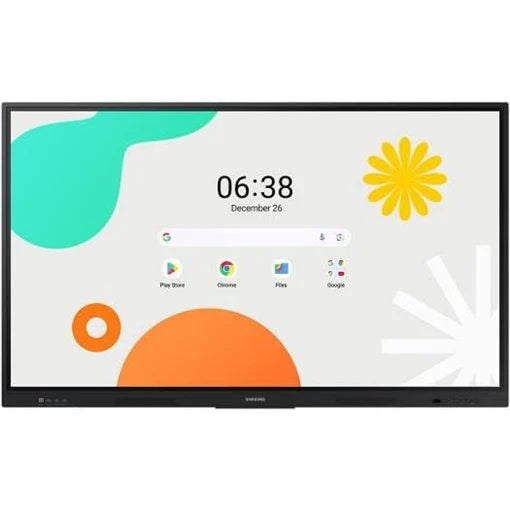
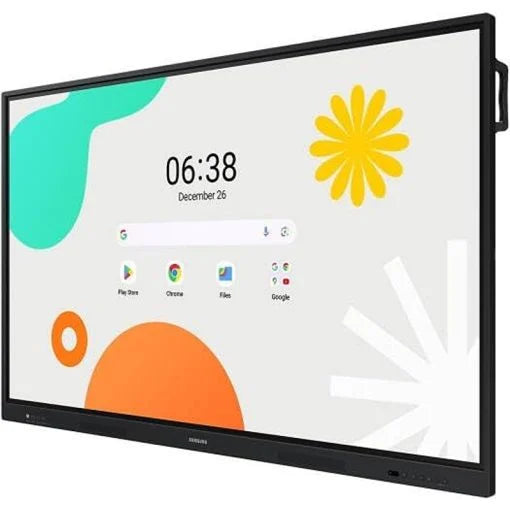
      Samsung WAF Series Interactive Display
      Samsung WAF Series Interactive Display
      Samsung WAF Series Interactive Display

      Samsung WAF Series Interactive Display

      $1,599.00
      • Audio & Visual
      • Samsung WAF Series Interactive Display

      LH65WAFWLGCXUE

      Size
      Size: 65"
       
      This item is a deferred, subscription, or recurring purchase. By continuing, I agree to the cancellation policy and authorize you to charge my payment method at the prices, frequency and dates listed on this page until my order is fulfilled or I cancel, if permitted.

      Unlimited Learning Possibilities

      The interactive display WAF series, powered by Android OS, enhances education with Google services and a seamless annotation function. Instantly take notes at any moment and empower students to collaborate independently in separate zones, ushering in a new era of interactive education.

      Unlimited Learning Possibilities


      An intuitive UX that fits your needs

      Powered by Android™

      The WAF series offers familiarity to its users. It’s compatible with other Android devices and provides a variety of widgets and an easily customizable home screen. These features create more flexibility in building an environment that suits various learning needs.

      An intuitive UX that fits your needs


      Effortless access to Google services

      EDLA Certification

      With an EDLA certification, the WAF series supports a variety of Google services like Google Play and YouTube. This access to major educational apps like Google Classroom leads to increased efficiency and enhanced communication with students.

      Effortless access to Google services


      Take notes instantly, anywhere on the screen

      Annotation On

      The WAF series lets users take notes anytime with a simple press of the always-visible Annotation button. Whether watching a video or viewing any content, users can seamlessly annotate without interruptions, avoiding the need to capture images first and enhancing productivity.

      Take notes instantly, anywhere on the screen


      Write independently, learn together

      Split Note Mode

      The upgraded Note app allows up to four independent note zones on a single page, enabling multiple students to use the whiteboard simultaneously. Students can work in their own zones without affecting others, fostering both collaboration and individual learning.

      Write independently, learn together


      Display multiple screens simultaneously

      Easy Multitasking

      The split screen and multi-window, enable teachers to easily display information and multitask at the same time on the WAF series. This flexibility provides convenient access to all the screens required to create engaging learning environments.

      Display multiple screens simultaneously

      Smart, wireless sharing on multiple devices

      Powerful Screen Sharing

      The WAF series supports screen mirroring for up to nine devices, increasing student engagement. This feature ensures every student is included and engaged as content can be shared on both the large display and individual devices. It can be used on iOS, Mac, Windows, Android, or Chrome OS.

      Smart, wireless sharing on multiple devices


      Better interaction with best-in-class multi-touch

      Multi-point touch drawing

      Multiple users can write and draw on the whiteboard at the same time with the display’s advanced multi-touch capabilities. Up to 40 simultaneous touchpoints are possible, allowing large groups of students and teachers to collaborate and learn together in a fun and natural way.

      Better interaction with best-in-class multi-touch


      Switch pens without changing settings

      Dual Pen

      The dual pen function enables the use of two different writing tools with no downtime. With the double-sided nib applied, users can effortlessly switch between two different colors on the front and back side of the pen – without needing to change the settings or interrupt the flow of the lesson.

      Switch pens without changing settings


      Front panel controls for intuitive navigation

      Quick Access Controls

      The WAF includes front-facing physical controls for quick access to frequently used functions. These intuitive controls allow users to operate the interactive display more efficiently, enhancing the overall user experience.

      Front panel controls for intuitive navigation


      Connectivity

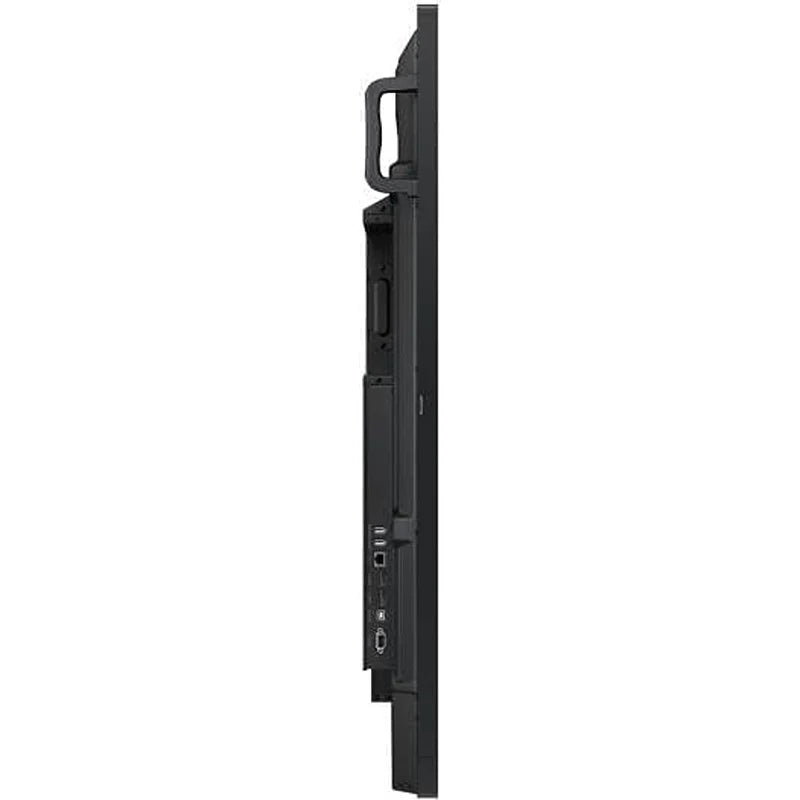
      At the top, the showcases the ports on the WAF display, with a magnified overlay of the USB-C port. Below this, a comparative diagram contrasts the setup requirements between a conventional display and the WAF display. The conventional screen setup, requires three distinct connections to a laptop: 1. USB for touch control, 2. HDMI for screen connection, and  3. a separate power cable. In contrast, the WAF display only needs a 1. USB-C connection all-in-one, demonstrating how it achieves the same connectivity with just a single cable.

      Convenient connectivity with USB-C

      3-in-1 USB-C port

      Connectivity is enhanced with the 3-in-1 USB-C port, enabling screen mirroring, touch control and external device charging (max. 65W). Teachers can simply connect to the USB Type-C port, allowing them to deliver interactive and engaging lessons without any hassle.

      In a large classroom filled with students, a central 75-inch WAF display mirrors its educational content onto smaller ceiling-mounted screens, ensuring visibility for all through HDMI connectivity.

      Accessible content for any class size

      HDMI out

      With the HDMI Out function, whiteboard screen content can be shared on a different and larger screen in the classroom. This feature ensures teachers can provide a real-time, interactive experience for students who can easily view the screen content regardless of where they sit in the classroom.

      Right side of the features a close-up of the WAF Display's OPS Slot at the rear, while the left side showcases the display with a Windows UI and wallpaper.

      Use your favorite OS for the learning

      OPS (Open Pluggable Specification)

      The OPS slot in the WAF series can transform the interactive display into a Windows device, eliminating the need for an extra PC or devices. Users will have access to all the features and functionalities they are familiar with from a standard computer, directly on the display.

      Device Management Solution

      An illustrating a laptop in the bottom right corner, connected to multiple WAF displays arranged in a grid-like fashion above. Each WAF screen mirrors the apps shown on the laptop, demonstrating the laptop's central management capability.

      Seamless management, efficient operations

      Device Mmanagement Solution

      The WAF series provides a device management solution* essential for advanced educational environments. This solution optimizes the remote management of whiteboard settings and applications, guaranteeing operational efficiency and stability.

      *The cloud-based DMS solution is provided free of charge for one year. However, pricing policy policies are is subject to change. For more details, please contact your account manager.Additionally, the WAF series provides an on-prem DMS solution, allowing customers to choose an option that best fits their local network requirements. *UX/UI images are simulated for illustrative purposes. App availability and content may change without notice.

      There is a cloud-shaped notification icon at the top, with three distinct classrooms depicted below, each equipped with a WAF display. The screens of all three WAFs show an identical message: 'Please go to the auditorium,' illustrating a unified communication system across different spaces.

      Notify across multiple devices, immediately

      Advanced Messaging

      Send important messages across campuses, classrooms and public spaces immediately. Urgent communications are displayed on interactive whiteboards so students and other personnel are alerted in real time.

      Seamless learning in various environment

      Superior durability

      The WAF series protects against electrical surges by using a glass fuse and 500V(DC) capacitor that absorbs instant spikes in voltage. It also is a valuable tool for schools in high humidity or rainy climate as it has anti-humidity glue applied to the critical area of the chipset.

      Seamless learning in various environment

      *The claims of enhanced surge and humidity protection for the WAF series are based on Samsung’s internal testing.


      Pairs well with

      Samsung WAF Series Interactive Display

      Samsung WAF Series Interactive Display

      65"
      $1,599.00
      Need help?

      If you have any questions, you are always welcome to contact us. We'll get back to you as soon as possible, within 24 hours on weekdays.

      • Shipping Information

        Our shipping service is provided by Aramex.We offer Two to Three Days delivery during working hours all around Lebanon from Monday to Saturday.

      • Refund or Exchange

        Our policy lasts 5 days. If 5 days have gone by since your purchase, unfortunately we can’t offer you a refund or exchange.

      • Contact Us

        Office: +961 1 252 474 ( Mon-Fri 8:00 AM – 5:00 PM )

        Online Store orders Support WhatsApp: +961 70 232 313

        Email: info@antaki.com.lb

      Customer service

      Contact us to learn more

      Fast Shipping

      Fast delivery all over Lebanon

      After Sales

      For all products under warranty

      Four Showrooms

      Discover. Compare. Select. Enjoy.

      House of Excellence

      Shop
      • Big Appliances
      • Small Appliances
      • TV & Audio
      • Electronics
      • Shop by Lifestyle
      • Shop by Brand
      • Gifting
      • Black Friday
      Support
      • Account
      • FAQ
      • Contact
      • About
      • A Wedding List
      • Antaki Group

      Stay in the loop with our monthly newsletter

      • Facebook
      • Instagram
      • YouTube
      • TikTok
      © 2026 House of Excellence - Antaki Group. 
      • Privacy policy
      • Refund policy
      • Shipping policy
      • Terms of service
      • Contact information
      • Mastercard
      • Visa
      • Choosing a selection results in a full page refresh.
      • Opens in a new window.